Highway Radar
- 4.2
- Rating
- 100.00K
- Installs
- Free
- Price

 Analysis by App-foxy
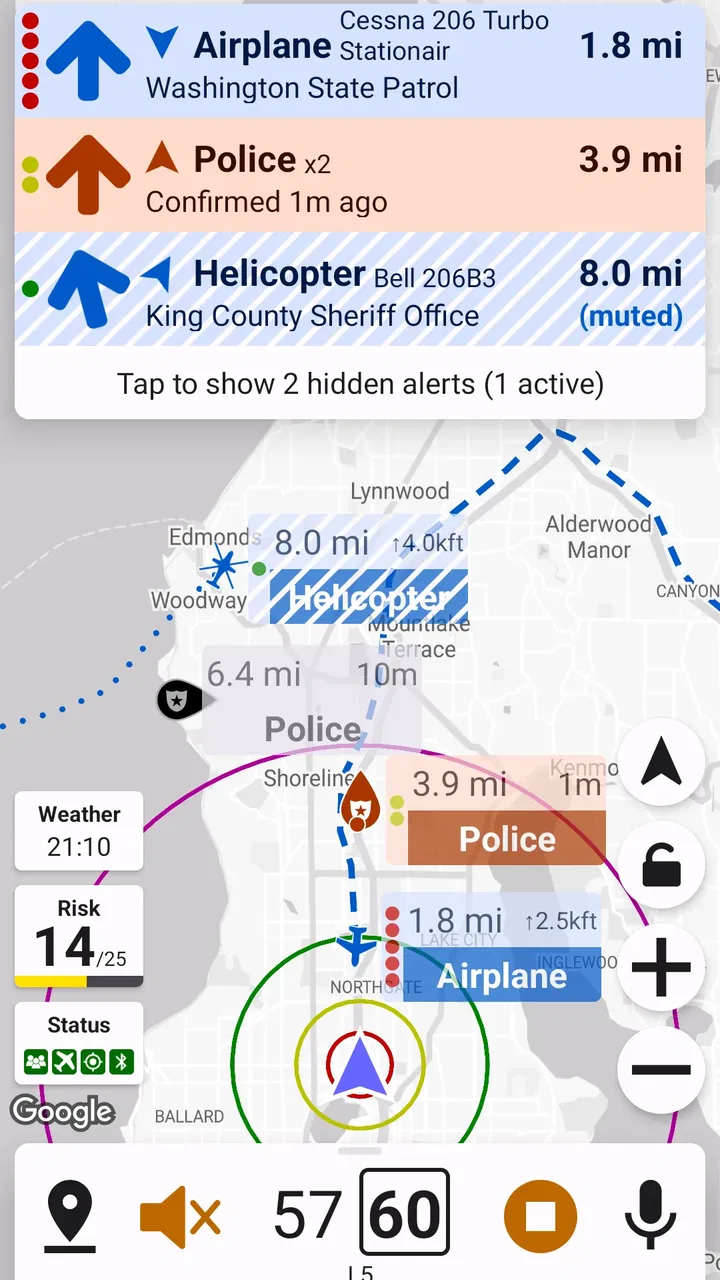
If you want earlier awareness of speed traps and road hazards, Highway Radar is the kind of driving companion I would try before relying on it every day. It is a free Auto & Vehicles app from Highway Radar, designed to give a driver more time to notice possible trouble ahead. That sounds simple, but the real value depends on how calmly and correctly you use its warnings.
My first impression is that this is not a replacement for attentive driving, navigation, or good judgement. It works best as an extra layer of awareness during a longer trip, especially when the road is unfamiliar and I would rather receive a prompt before reaching a potentially difficult area. The app is available for everyone, supports Android 7.0 and later, and its current release is version 3.2, update 7.
What Highway Radar feels like in everyday driving
The most useful way to think about Highway Radar is as a lookout rather than a driver. It can help draw attention to possible speed enforcement and road hazards, but I would never treat an alert as proof that a hazard is definitely present or that the road is safe everywhere else. Traffic conditions change, reports can become outdated, and a warning may require a sensible response rather than a sudden manoeuvre.
You May Also Like

 Google Keep - Notes and lists
Google Keep’s Quiet Growth Shows the Appeal of Simpler Notes
As mobile work gets busier, Google Keep keeps winning a simple contest: capture a thought quickly, find it later, and get on with the day.

 Blood Strike: 2.5 Anniversary
Blood Strike’s Loadouts Turn Every Drop Into a Tactical Gamble
A close look at Blood Strike’s custom loadouts: how fast access to signature weapons reshapes its battle royale rhythm, rewards preparation, and narrows the gap between fights.

 Pandora - Music & Podcasts
Pandora’s Music Is Easy to Start, but Harder to Recover
Pandora’s strength is its low-effort path from a seed to a station. Its weak spot is how much confidence it asks you to place in connection, setup, and quiet recovery.

 8 Ball Pool
 Is Built on Rivalries, Rematches, and Routine
A close look at the rivalries, rematches, shared routines, and unanswered safety questions that turn a quick pool match into a persistent mobile community.

 Samsung Music
’s Quiet Strength Is Playing What You Already Own
Its reach comes less from spectacle than from dependable access to a personal library. That simplicity is both the app’s strongest retention engine and its ceiling.

 AccuWeather: Weather Radar
AccuWeather Review: A Quick, Clear Forecast for Everyday Decisions
For everyday plans, the best forecast is the one you can understand quickly. AccuWeather makes rain timing, radar, and local conditions easy to act on, with a few trade-offs.
More From Our News Desk



That distinction matters for first-time users. The app’s purpose is not to encourage faster driving or last-second braking. Its benefit is giving me a chance to check my speed, look farther down the road, and prepare for a change in conditions. Used that way, it fits naturally alongside a navigation app or a familiar route plan.
In a realistic everyday situation, I might start it before a weekend drive through roads I do not know well. Once I am moving, a warning could prompt me to ease off the accelerator, increase my following distance, and pay closer attention to signs and traffic. The app has done its job even if nothing dramatic happens afterward. The successful outcome is a safer, calmer decision, not simply reacting to a notification.
The app has built a modest but meaningful audience: it has passed one hundred thousand installs, with a 4.2 average from 443 ratings and 159 reviews. I see those figures as encouraging rather than definitive. They suggest that many drivers find the idea practical, while the relatively focused nature of the app means it is still worth testing on the routes where I personally drive.
Who will get the most from it
I think Highway Radar is best suited to drivers who regularly travel on highways, commute through unfamiliar areas, or want an additional reminder to stay alert around possible enforcement and hazards. It can also be useful for someone who already uses navigation but wants a separate focus on road awareness rather than directions alone.
It is less suitable for a person looking for a complete navigation system, live traffic planning, or a substitute for reading road signs. If your main need is turn-by-turn guidance, route changes, fuel stops, or public transport information, a conventional navigation app will usually be the better primary tool. Highway Radar makes more sense as a companion, not as the only app open during a journey.
I would also skip it if alerts make you anxious or tempt you to stare at the phone. No warning system is worth taking your eyes off the road. The safest setup is one that lets me hear or notice an alert without handling the phone while driving, then respond only when it is safe and legal to do so.
Getting through the first setup without overthinking it
After installing the app, I would begin by treating setup as a short preparation step rather than something to explore while already driving. Open it while parked, look through the main screen, and make sure you understand where alerts appear. The goal is to recognise the app’s signals before a real warning arrives on a busy road.
Because this is a driving-focused tool, I would also check the phone’s general sound and notification behaviour before leaving. A warning that is technically generated but impossible to notice is not useful. At the same time, I would avoid making every sound on the phone loud enough to become distracting. The right balance is a clear prompt that supports attention instead of competing with it.
One practical habit is to start the app before pulling away, not after the journey has already begun. That removes the temptation to unlock the phone, search for the app, or adjust anything while moving. I would place the device where it can be seen only briefly and where it does not block the road, dashboard controls, or my view of mirrors.
Another good first step is to test the workflow on a familiar, low-pressure route. A short drive gives me a chance to learn how the app presents a warning and whether its timing feels understandable. I would not use that test to challenge an alert or deliberately approach a possible speed trap. I would simply observe how the information fits into normal driving.
The first meaningful success is a better decision
For a new user, the first successful action should be deliberately ordinary. Start Highway Radar while parked, begin a familiar drive, and use any alert as a reminder to check the road, signs, speed, and spacing from other vehicles. If the warning helps me make that check earlier and more calmly, the app has already proved its value.
This is an important mindset because some people expect a driving alert app to produce a constant stream of dramatic notifications. That is not the standard I would use. A quiet drive does not automatically mean the app is failing, and an alert does not automatically mean I need to brake sharply. The useful result is improved preparation.
I also recommend keeping the first test simple. Do not combine it with a new route, poor weather, an unfamiliar phone mount, and a complicated audio setup. Change one thing at a time. If the experience feels confusing, I can identify whether the problem is the app’s presentation, the phone’s notification settings, or my own unfamiliarity with the workflow.
On a longer trip, I would use a similar routine: prepare before departure, let the app run as a background aid, and only inspect the screen when stopped. This approach turns the app into a quiet assistant rather than another source of visual workload. The safest alert is one that leads to a calm check, not a sudden reaction.
How to interpret warnings responsibly
A warning should be treated as information to verify through the road itself. I would look for posted limits, lane changes, stopped vehicles, unusual traffic patterns, construction signs, or anything else that explains why extra care may be needed. The app can draw my attention forward, but it cannot replace what I see in front of me.
This is where Highway Radar differs from relying only on a navigation app. Navigation is usually concerned with reaching a destination efficiently. Highway Radar’s role is narrower: it focuses my attention on possible speed traps and hazards. That focus can be valuable, but it also means I should not expect it to handle every part of a journey.
Compared with simply watching the road without any additional tool, the advantage is the possibility of earlier notice. Compared with a broad navigation suite, the advantage is concentration on driving-related warnings rather than route planning. The trade-off is that I may need both apps, and I must prevent overlapping sounds or visual prompts from becoming distracting.
Compared with informal driver reports or word of mouth, an app is easier to consult consistently, but I would still keep a healthy level of caution. A report is not a guarantee, and road conditions can change after any warning is created or observed. My driving decisions should always follow current signs, traffic, and the law.
Common confusion during the first few drives
The first confusion is often assuming that every warning demands an immediate action. I would not respond by swerving, braking hard, or changing lanes without checking the surrounding traffic. Instead, I would reduce unnecessary speed smoothly when appropriate, keep a safe gap, and continue scanning the road.
A second misunderstanding is expecting the app to know everything that can happen ahead. Speed traps and hazards are not the same as a complete picture of traffic. A sudden obstruction, a driver who changes lanes carelessly, or a weather-related problem may require attention even when no alert appears. Highway Radar should add awareness, never reduce it.
A third issue is using the phone as if it were a dashboard instrument that needs constant monitoring. I would avoid repeatedly checking the display. If the phone is demanding too much attention, the setup is working against the purpose of the app. Prepare it before driving and rely on the road first.
Some users may also wonder whether the app is appropriate for every trip. In my view, it is most helpful when the route, enforcement patterns, or road conditions are unfamiliar enough that an extra reminder has value. On a short trip I know extremely well, the benefit may be smaller. That does not make the app useless; it simply means its usefulness depends on context.
The age rating is Everyone, which makes the app broadly accessible, but that does not remove the need for mature driving behaviour. A driver should be old enough and legally permitted to operate the vehicle, follow local rules, and make sure no app feature becomes a distraction.
Small habits that make the app more useful
My first recommendation is to establish a pre-drive routine: open the app while parked, confirm that the phone is positioned safely, and begin the trip only after everything is ready. This is more valuable than learning new controls halfway through a journey.
Second, use Highway Radar as a prompt to create more space around the vehicle. When I receive a warning, the best response is often not a dramatic manoeuvre but a wider margin: a little less speed when suitable, a longer following distance, and more time to read the road. This turns the alert into a defensive-driving advantage.
Third, separate the app’s information from my confidence level. A familiar road can still contain a new hazard, while an unfamiliar road may be perfectly clear. I would avoid becoming either overconfident when no alert appears or overly nervous when one does. The app should improve judgement, not replace it.
Fourth, test it during daylight and normal traffic before depending on it for a demanding night journey. That gives me a clearer sense of how its alerts fit into my own driving habits. If the phone’s sound is hard to notice, or if the visual presentation pulls my attention too often, I would fix that before using it on a long trip.
Finally, keep a navigation app or a planned route available when directions matter. Highway Radar is not the tool I would choose for finding an address, rerouting around congestion, or organising a multi-stop journey. Pairing it with the right companion app is more sensible than expecting one focused tool to do everything.
Where the free model fits
Highway Radar is free, so trying it does not require a purchase decision. That makes it easier to evaluate honestly on my own routes instead of guessing from a description. I would give it several ordinary drives before deciding whether its alerts genuinely improve my awareness.
The free price is especially appealing to occasional drivers who want an extra layer for road trips without committing to a larger driving service. It is also useful for experienced drivers who already know what they want from a warning tool and do not need a complete navigation package.
Still, free does not mean friction-free. The app can only be as useful as my phone setup, attention, and willingness to interpret alerts sensibly. If I expect perfect coverage, exact timing, or a replacement for road knowledge, I am likely to be disappointed. The right expectation is modest but practical: earlier awareness can support better decisions.
My recommendation after using it as a companion
Highway Radar earns a place on my shortlist for drivers who want focused help noticing possible speed traps and hazards before they are close. Its strengths are its clear purpose, free access, broad compatibility with Android 7.0 and later, and usefulness as a supplement to normal road awareness. The developer, Highway Radar, has kept the concept focused rather than turning it into a general-purpose travel tool.
I would recommend it to a first-time user who is willing to set it up while parked, test it on a familiar route, and treat every warning as a reason to look and think rather than react blindly. That path makes the first experience reassuring and gives the app a fair chance to prove itself.
I would not recommend relying on it alone for navigation, traffic management, or safety decisions. Drivers who dislike alerts, cannot safely position their phone, or tend to monitor screens while moving should choose a simpler arrangement. In those cases, attentive driving and a properly configured navigation system are more important than adding another tool.
Overall, I see Highway Radar as a focused driving aid with a sensible place in a careful driver’s routine. It will not make a route safe by itself, and it should never encourage speeding or distracted driving. Used with restraint, however, it can provide the extra moment that helps me check my speed, notice the road sooner, and make a smoother decision. That is a practical benefit, and for a free app with an Everyone rating, it is a reasonable one to try.
FAQs for Highway Radar
01What is Highway Radar and what does it do?
Highway Radar is a driving-assistance app designed to help motorists stay more aware of potential hazards on the road. It can use your phone’s camera, GPS, and other available sensors to identify or report situations such as speed enforcement areas, traffic conditions, road incidents, and nearby alerts. It is best treated as an additional source of information, not a replacement for careful driving or your vehicle’s built-in safety systems.
02Does Highway Radar work without an internet connection?
Highway Radar’s functionality may vary depending on the feature being used. GPS-based positioning can often continue working when mobile data is unavailable, but live traffic information, community reports, map updates, and cloud-based detection generally require an active internet connection. Before starting a trip, it is a good idea to open the app, check permissions, update its data, and confirm whether the required maps or alerts are available offline.
03What permissions does Highway Radar require?
Because Highway Radar is intended for use during driving, it may request access to location services, mobile data, notifications, the camera, and sometimes background activity. Location access supports navigation and nearby alerts, while camera access may be needed for visual road analysis or dashcam-style features. You should review each permission carefully and enable only what you are comfortable using, since restricting access can reduce the app’s accuracy or available features.
04Can Highway Radar detect every police checkpoint, camera, or road hazard?
No driving-alert application can guarantee that every enforcement point, camera, accident, obstruction, or hazard will be detected. Highway Radar may combine sensor-based analysis with map data and user reports, so accuracy can depend on your location, weather, road layout, database freshness, and the number of active contributors. Alerts should be considered helpful warnings rather than definitive information, and you must always follow posted signs and local traffic regulations.
05Is Highway Radar safe and legal to use while driving?
Highway Radar can be useful when configured before a journey and used responsibly, but interacting with a phone while driving may be dangerous and illegal. Set up your route, volume, alerts, and mounting position before moving, then rely on audible notifications whenever possible. Laws concerning radar detectors, speed-camera warnings, recording, and phone mounts differ between countries and regions, so check local regulations and never allow the app to distract you from the road.
Pros
- Real-time alerts help identify police
- crashes
- and hazards ahead.
- Displays useful speed
- distance
- and route information while driving.
- Can complement navigation apps without replacing your preferred map service.
- Community reports may provide warnings that official traffic data misses.
- Useful for frequent highway drivers and long-distance road trips.
Cons
- Accuracy depends heavily on active users and reliable location data.
- Too many alerts can become distracting during busy drives.
- Some features may require a subscription or in-app purchases.
- Background GPS use can increase battery consumption on long journeys.
- Coverage and alert quality may vary significantly by region.

Highway Radar
Gallery